
LasseSMP Life Server
Getting Started
Welcome. presumably if you're here you've been linked here by someone else in the group. I've set everything up to try and make it as easy as possible for people with little to no experience modifying Minecraft, since we're using Fabric Mod Loader as we do not have access to the original Datapacks used. Also we want Proximity Voice Chat and that needs mods regardless.
Installation
This is (hopefully) reasonably easy. I don't have access to a Windows 10 or 11 Computer so I will need to get someone else to confirm this all works fine over there. I have absolutely no idea how Mac works, if a Mac user reads this and gets it all working please let me know steps so i can write it here :).
If you're an advanced user you can probably get this working with other launchers, but I've made the modpacks run seamlessly for PrismMC so it's strongly recommended.
- If you are such a user that does not want to use PrismMC, you can get the modpack files via this link
- Navigate to PrismMC and select your installer. If you're on Windows that most likely means the .exe. For Linux I can recommend the .appimage, it is working great for me and keeps things simple.
- On Windows run the .exe as you would any other installer.
- On Linux move the .appimage to where you'd like it to be. Right click it, go to Properties -> Permissions, and enable executing file as program. This is off be default as a security measure on Linux.
- Run PrismMC and log in with your Microsoft Account. Once you've done this you should be greeted with the following window, just with no "Instances" present yet:
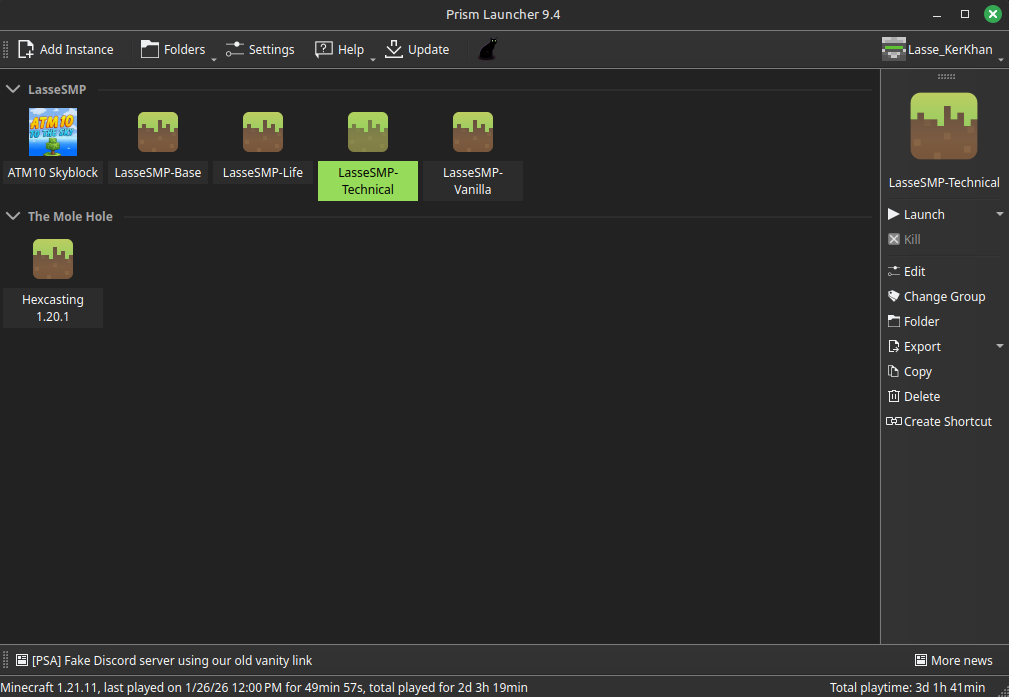
- Click Add Instance, and on the right go to the second Tab "Import". copy
https://files.lassesmp.net/files/LasseSMP-Life.zipinto the Import field. It will automatically name it, group is not necessary to set: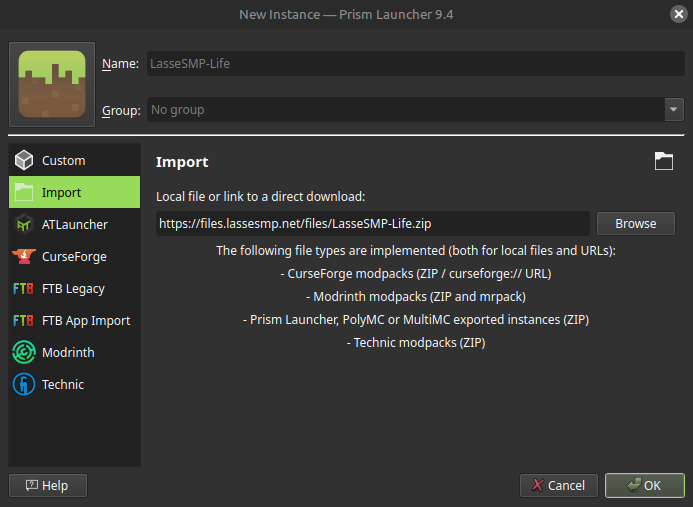
- When you click OK it will pull the correct minecraft version, the mods, resource packs, and prepare the server in Server List.
- Double click LasseSMP-Life (It may look different that in the screenshots if I've updated the Logo) and the client should open. If it doesn't either @Lasse Ker'Khan on discord, or get someone to.
- You will probably want to change some settings, I play on Quake Pro FOV and the client will have my default settings loaded. Resource Packs should be loaded correctly by default.


Customization
If you like to play with your own Resource Packs or Shaders these are fairly easy to add. Note that if they considerably change appearance of the game you may build something that looks great on your end but mediocre to people not using your Packs or Shaders.
- Within the PrismMC Launcher, right click LasseSMP-Life, and select Edit.
- Navigate on the right side to Either Resource Packs or Shader Packs.
- For Resource Packs you can either "Download Packs" on the right, to download from Modrinth or Curseforge, or "Add" to import your own ones.
- For Shaders it's the same, on the right click "Download Shaders" and you can download straight from Modrinth or Curseforge, or "Add" to import ones not available from those places.
Troubleshooting
Realistically, ask someone for help. but for common things I'll list them here.
- Running out of RAM
- Within the PrismMC Launcher, select Settings at the top, and navigate to Java on the left.
- Under Memory, if you have 16 GB available on your system then set the "Maximum memory allocation" to 11,444MiB. Any more than this can actually have a negative impact on performance due to Java quirks. 11,444MiB has been optimal in my testing.