
LasseSMP Life Server
Getting Started
Welcome. presumably if you're here you've been linked here by someone else in the group. I've set everything up to try and make it as easy as possible for people with little to no experience modifying Minecraft, since we're using Fabric Mod Loader as we do not have access to the original Datapacks used. Also we want Proximity Voice Chat and that needs mods regardless.
Installation
This is (hopefully) one of the easiest bits. I don't have access to a Windows 10 or 11 Computer so I will need to get someone else to confirm this all works fine over there. I have absolutely no idea how Mac works, if a Mac user reads this and gets it all working please let me know steps so i can write it here :).
Install PrismMC
If you're an advanced user you can probably get this working with other launchers, but I've made the modpacks run seamlessly for PrismMC so it's strongly recommended.
- Navigate to PrismMC and select your installer. If you're on Windows that most likely means the .exe. For Linux I can recommend the .appimage, it is working great for me and keeps things simple.
- On Windows run the .exe as you would any other installer.
- On Linux move the .appimage to where you'd like it to be. Right click it, go to Properties -> Permissions, and enable executing file as program. This is off be default as a security measure on Linus.
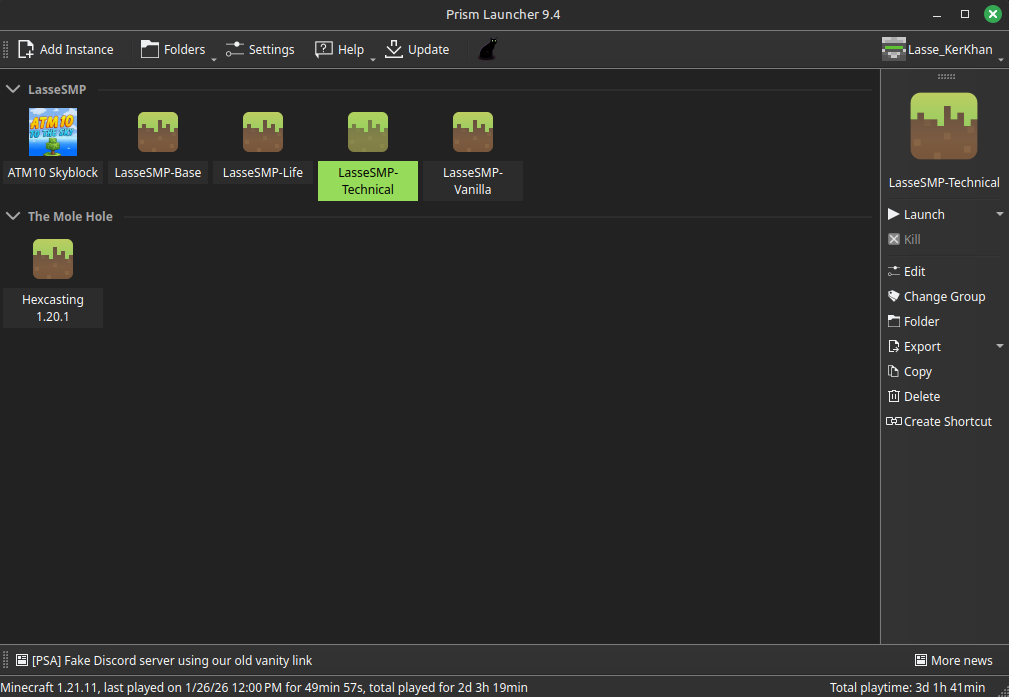
- Run PrismMC and log in with your Microsoft Account. Once you've done this you should be greeted with the following window, just with no "Instances" present yet:
- Click Add Instance, and on the right go to the second Tab "Import". copy
https://files.lassesmp.net/files/LasseSMP-Life.zipinto the Import field. It will automatically name it, group is not necessary to set
